Connect once
claude mcp add --transport http --scope user artifact-guru https://mcp.artifact.guru/mcp--scope user makes it work in every folder, not just the one you ran it in. Then type /mcp in Claude Code and choose artifact-guru. Your browser opens: sign in, tick the workspaces Claude may use (your personal one, your team’s, or both) and approve. There are no API keys to copy, and the connection stays signed in for months while you use it.
New files go to the first workspace you ticked. To use another, name it: “publish this to the Acme workspace”.
A session, start to finish
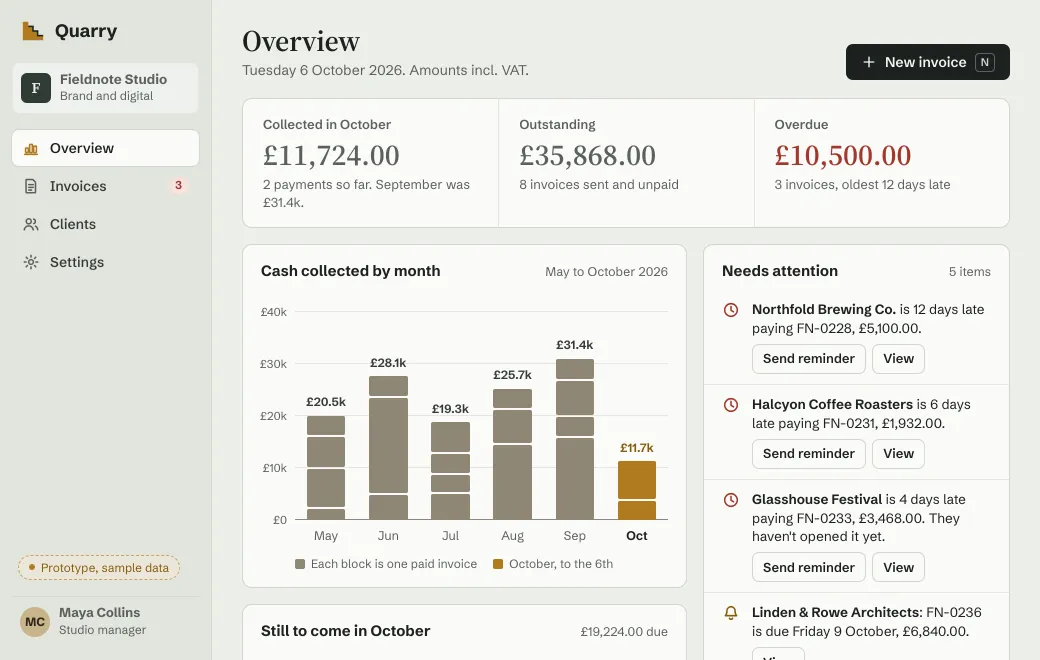
Quarry’s invoicing prototype is a single HTML file, shared with a secret code. Mark an overdue invoice as paid, and the totals and the chart update.
A session like this one takes three requests, from the first publish to a small layout change:
> Publish prototype/index.html to artifact.guru as “Quarry invoicing”,
  with the link name invoicing-prototype.

  Published “Quarry invoicing” to the Quarry workspace as version 1.
  https://artifact.guru/quarry/invoicing-prototype
  Who can open it: Private, so only people in the Quarry workspace.

> Put a secret code on it that lasts 30 days.

  Done. Anyone with the link and the code can open it.
  Code: KM7Q-4XPA, valid for 30 days. Send it separately from the link.

> On Overview, move the Overdue figure above the chart. Keep the rest.

  Read version 1, changed 2 lines in index.html and checked a picture
  of Overview. Version 2 is live at the same link, and the code still works.
The link stays the same throughout. Send the code separately from it, for example the link by email and the code in chat.
A single file, a folder or a zipped site
| You have | What Claude Code sends | What people open |
|---|---|---|
One .html page with everything inline | The file, straight through the connection | The page, running |
A React component (.jsx, .tsx) | The file | The component, compiled in the browser |
| Markdown, Mermaid or Excalidraw | The file | A formatted page, a diagram or a sketch |
| A folder: a built app, or a page with its own CSS, scripts and images | A .zip it makes of the folder, uploaded first | One artifact, served as a site |
| PDF, Word or PowerPoint | Uploaded first, as bytes | Pages, a document or slides to click through |
| Images | Uploaded first, as bytes | The picture, full size |
The size limits are 5 MB for an HTML page or React component and 2 MB for Markdown. Other files can be up to 100 MB, or 250 MB on Team. A zipped site can be up to 25 MB, and 64 MB once unzipped.
Revise it at the same link
Say what should change, in your own words. Claude Code reads the current source, sends only the lines that change and checks a picture of the result. An edit applies in full or not at all. It becomes the next version, and people see it the next time they open the link.
For a folder or a binary file, ask for the new build to go to the same artifact. You might say “publish the new dist folder to the Quarry invoicing artifact”. It becomes the next version too.
When someone changed it first
If a teammate edited the file in the app after Claude Code read it, the edit is refused instead of overwriting their work. Claude Code is told which version it read, which one is live and who published it:
You read v2, but v3 is live now (by Priya Raman). Read it again with read_artifact and redo the edit. Nothing was changed.It reads the file again and redoes the edit on top of theirs. Nothing is lost on either side.
What teammates and clients see
- Teammates open every link in the workspace once signed in, whatever its mode. In a team workspace, Private already means the whole team.
- Invited clients see Sign in to open, on a phone or a laptop. They type the invited address and get a one-time code by email. Someone new creates an account in the same step, with no password and no plan.
- People with a code see Enter the code, type it and choose Open. They need no account.
- Anyone with a public link sees the page straight away.
Each link opens under a slim bar with the title, Copy link and Download.
Views in the app shows counts on every link, and names on Private and Email links, where people sign in. Agents can’t read views, so open the artifact to check.
Versions and rollback
Every publish and every edit is a numbered version at the same link. The Versions list beside the preview shows each one and who published it, so Claude’s changes and a teammate’s are easy to tell apart.
- Say “roll the prototype back to version 1”, or choose Roll back in the list. The link shows it at once.
- Rolling back keeps the newer versions. Make live moves forward again.
- Older versions count toward your storage (10 GB on Individual, no limit on Team). Delete them from the Versions list when you need space.
Set it up for a team
- Create a team workspace
On the Team plan: $30 a month for 3 editors, then $8 per editor, up to 15.
- Each person connects their own agent
Everyone runs the command above in their own terminal and ticks the team workspace when approving. Teammates in Codex, Gemini CLI or claude.ai connect with the same address.
- Publish to the team
Name the team workspace, or tick it first. What’s published there is the team’s, and any teammate’s agent can find and edit it.
On Claude’s Team and Enterprise plans, an Owner adds the connector in claude.ai first, and then each member connects to it. Membership is checked on every call, so when someone leaves your team, their agents lose access at once.
If something doesn’t work
| What you see | What to do |
|---|---|
| The browser never opened | Remove the artifact-guru server in Claude Code and run the add command again. |
| Calls fail with “401” or “invalid token” | Claude Code lost its sign-in. Reconnect the server and approve again. |
| The file went to the wrong workspace | New files go to the first ticked workspace. Name the workspace in your request, or ask Claude to move it. |
| Claude says the server can’t read a local path | The server can’t see your computer. Ask Claude Code to upload the file; it has file access, so it can send the bytes. |
| The page loads without its styles or images | It uses local files. Publish the folder as a site, or ask for one self-contained HTML file. |
When you don’t need artifact.guru
- You’re showing it on your own screen. Run it locally.
- Everyone who needs it uses Claude, and Claude’s own sharing fits. See Who can open a shared Claude artifact.
- It needs a server, a database or secret keys. That needs a real host.
Limits
- No CLI or REST API. Claude Code connects over MCP; people upload in the browser.
- No comments and no co-editing. Changes arrive as versions, from you, your agent or a teammate.
- Open pages don’t refresh themselves. People see a new version when they next open the link.
- No invitation emails and no alerts when someone opens a link.
- No server behind pages, so forms store nothing.