Four things to sort out
- Make it open as a page. It needs a web address, not an attachment.
- Give it everything it needs. One self-contained file, or a folder or zip with its styles and images.
- Choose who can open it. Your team, invited people, anyone with a code, or anyone at all.
- Keep it current. Changes should reach the link you already sent.
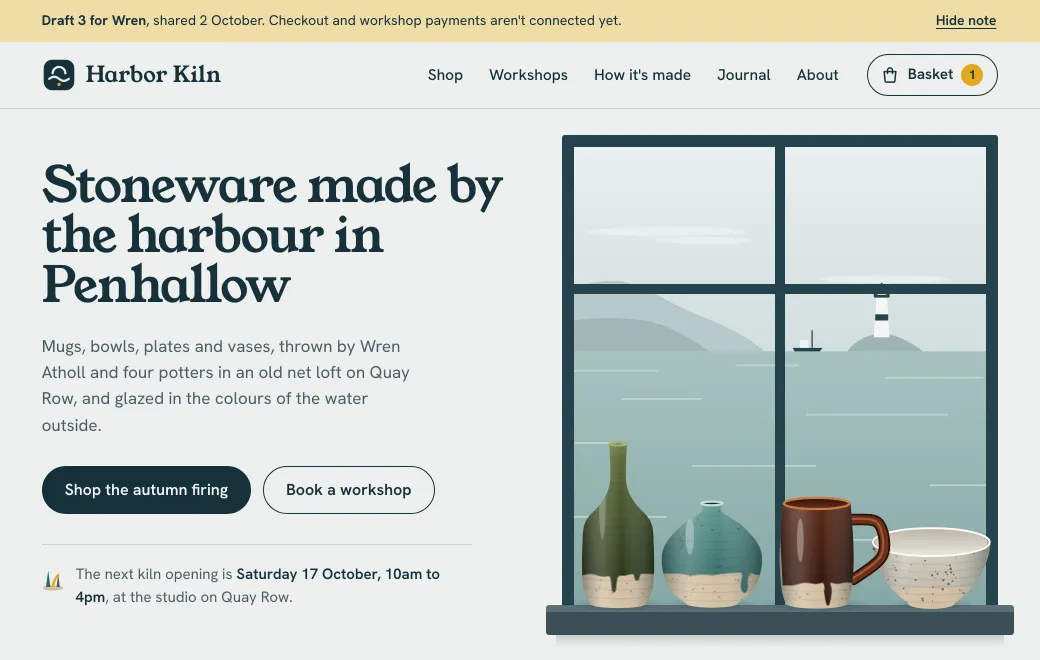
In the website draft below, click the brown mug to try it in another glaze, then add it to the basket.
Why an attachment doesn’t show the page
The Harbor Kiln draft is a whole pottery shop in one HTML file, with a basket, a workshop calendar and a newsletter signup. Open it from a link and all of that works. Email the same file and it usually arrives as a download or a page of code.
HTML is a set of instructions for a browser, and the page exists only once a browser loads it from a web address. Email and chat apps treat an attachment as a document to download or preview. Running scripts from someone else’s attachment would be a security risk, so previews tend to show the code, or the text without its scripts. File-sharing apps store the file; most show its code or offer a download instead of running it.
Even if the file does open from a downloads folder, anything it loads by a relative path is missing, such as styles.css or photos/mug.jpg. Those files stayed on your computer.
Check what the file needs
| Your page | What to publish |
|---|---|
Everything inside one .html file | The file as it is |
| Loads libraries or fonts from other sites by full address (esm.sh, jsDelivr, unpkg) | The file as it is |
| Uses local CSS, scripts or images | The folder, or a .zip with index.html at the top |
| A built app (Vite, Next export) | The build folder. Set relative asset paths, such as Vite’s base: "./". |
| Needs a server, database or secret keys | A real host. See the last section. |
Publish it
- Sign in to artifact.guru
Or create your workspace.
- Drop the file on the page
Or use Upload files. For a site with several files, use Upload folder, or drop the
.zip. - Open it to check
The preview runs the page as visitors will see it. It starts Private, so only your workspace can open it.
From an agent, connect artifact.guru once with this address, then ask in plain words:
https://mcp.artifact.guru/mcp- “Publish harbor-kiln.html to artifact.guru and give me the link.”
- “Zip the dist folder and publish it to artifact.guru as one site, privately.”
A single HTML page is text, so any connected agent can publish it, chat apps included. A zipped site travels as a file, which takes an agent that can upload files, such as Claude Code, Codex, Gemini CLI or Grok Bot.
What recipients see on a phone
A secret-code link opens on “Enter the code”, with a box for the eight characters and an Open button. An Email link shows “Sign in to open”. They tap Continue and type the invited address, and a one-time code arrives by email. There’s no password and no plan. A public link opens straight away.
Then the page runs under a slim bar with its title, Copy link and Download. For a website draft, switch off Show controls in the Share panel so it fills the screen like the real site. Whether it fits a phone is up to the HTML, so ask your agent for a responsive page and check it on yours.
Pasted into a chat app, a public link unfolds into a card with its title. Code and Email links show a plain “Protected link” or “Invite-only link” card, without the title.
Update it
Edit the page in the app, where HTML opens as source beside a live preview. Or ask your agent: “In the Harbor Kiln draft, change the wheel taster to £58. Change nothing else.” Your agent can also publish a new file to the same artifact. Each change is a new version at the same link, and readers see it the next time they open the link or reload an open tab. If something breaks, use Roll back in the Versions list. There’s more in Update a page you’ve already shared.
Limits
- One HTML page or React component: up to 5 MB. A zipped site: 25 MB zipped and 64 MB unzipped. A folder upload: 100 MB, up to 1000 files.
- Pages run in a sandbox on a separate domain, with no cookies.
localStorageworks but lives in memory, so it resets when the page reloads. - There’s no server behind the page. Point forms at a form service by its full address, or use an email link.
- Anyone who can open the page can read its source.
- Shared pages ask search engines not to index them.
When you need a real host instead
artifact.guru serves your files; it doesn’t run code on a server. Use a real host when the page needs:
- A server or a database: accounts, saved orders, or bookings that other visitors see.
- Secret keys: an API key inside the page is readable by everyone who opens it.
- Real payments: a checkout connected to a payment provider.
- Search traffic: shared pages ask search engines to stay away, so a site that should be found belongs elsewhere.