Content reads differently on the page
Website copy approved in a document often gets rewritten as soon as it’s on the page. The headline wraps badly, or the button label doesn’t fit on a phone. Reviewing the copy in place saves that second round.
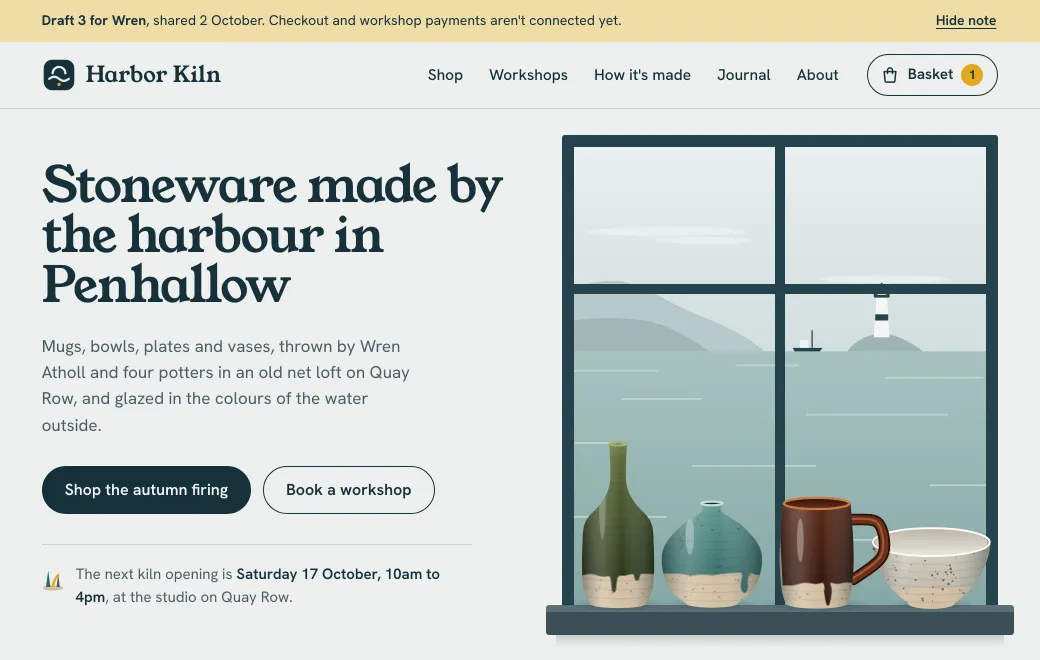
A screenshot can only show the page. In the Harbor Kiln draft above, you can try a mug in another glaze or book a seat at a workshop.
How it works
- Build the draft with real content
Ask your agent to build a responsive site from the approved copy and brand. It can be one HTML page, or a folder or
.zipwith several pages. - Publish and check it
Say “publish this to artifact.guru”, or drop the folder on your workspace. Open it on your own phone before anyone else does.
- Send the link with a code
Turn on a Secret code and send it separately. The client needs no account, and nobody who only sees the link can open it.
- Revise at the same link
“Shorten the hero line to one sentence and swap the order of Workshops and Journal.” The agent changes only that, and the client reloads the link they already have.
A review round, in practice
| Round | What the client said | What you asked the agent |
|---|---|---|
| 1 | “The shop is lovely. Bowls should come first.” | “Make Bowls the first shop filter.” |
| 2 | “Delivery is included over £60, not £50.” | “Change the delivery threshold to £60 everywhere.” |
| 3 | “Can we take workshop bookings?” | “Add a workshop calendar with seats left.” |
Each round is a version with a message. If round three goes too far, roll back to round two in a click and keep three for later.
On your own domain
On Individual and Team plans you can connect a subdomain like previews.youragency.com, and public and secret-code links move there. Clients see your name in the address.
Limits
- Pages run in a sandbox in the visitor’s browser, with no server behind them. A form can still post to a form service by its full address.
- There are no comment threads on the page. Collect feedback where you already talk to the client, then ask the agent to make the change.
- When the site is approved, deploy it to its real host. The draft link can stay as the record of what was approved.