What the request involves
- What should the model do? Settle one decision with a few inputs and one clear result. Write it down before you ask.
- Who builds it? Your agent builds it as a single HTML page, from a brief you can copy below.
- How do I trust it? Test it against a few results you can work out yourself.
- How does the room use it? Everyone opens the same link while you present it full screen. Fixes go to that link too.
Write the model down first
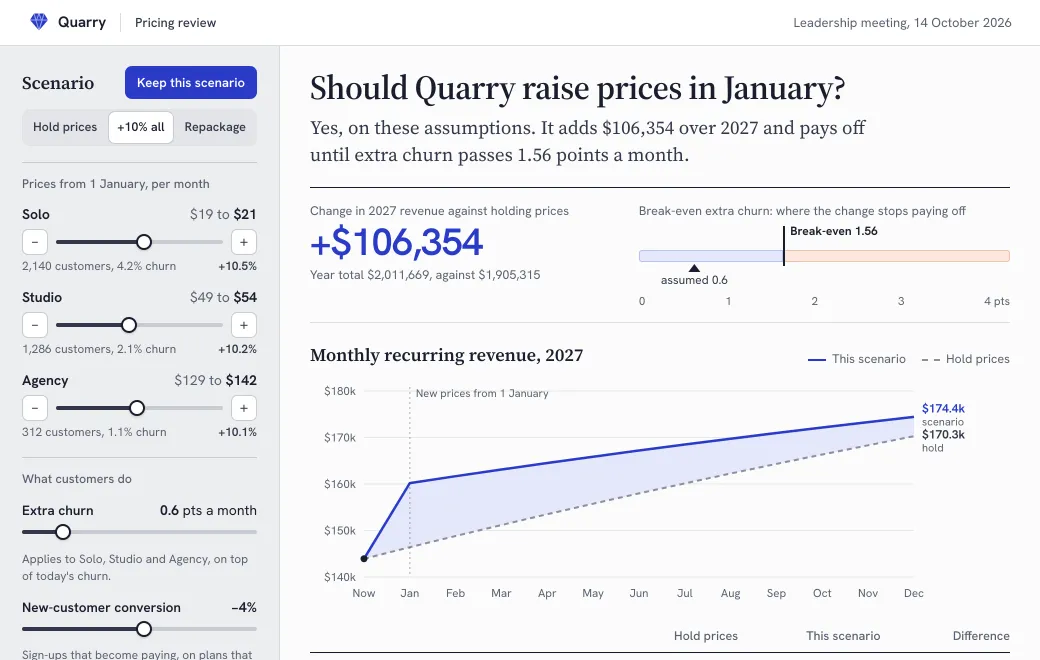
Calculator bugs are often decisions nobody made. The Quarry pricing model below was built from a brief like the one in the next section. Drag Extra churn past break-even and the verdict flips.
It was made for a leadership meeting on October 14 that has one question to settle: should Quarry raise prices in January? The three plans start at today’s prices, Solo at $19, Studio at $49 and Agency at $129. You can change each plan’s price, extra churn, new-customer conversion and the share of customers who pay annually. The answer is how much 2027 revenue changes against holding prices. The page also has a break-even gauge, a monthly chart and a heatmap of price rise against churn.
Decisions to make before you ask
- What happens when a price goes down? In Quarry’s model, extra churn applies only to plans whose price rises.
- What does break-even mean? For Quarry, it’s the extra churn at which the 12-month revenue change reaches zero.
- Is revenue cash or recurring revenue? Here it’s monthly recurring revenue, summed over the year.
- What stays fixed? Nobody switches plan.
A brief to copy
Paste this with your starting numbers, and change the decision and inputs to yours:
Build a scenario model for our pricing meeting as one self-contained HTML page.

The decision: should we raise prices in January?
Starting point: three plans, each with a price, a customer count and a monthly churn rate (attached).
Inputs: a new price per plan, extra churn in points a month, a change in new-customer conversion, and the share of customers on annual billing at 15% off.
Model: each month, customers change by new sign-ups minus churn; revenue is customers times price. Extra churn applies only to plans whose price rises.
Result: the change in 12-month revenue against holding prices, as one sentence and one number, with a monthly chart of both lines.
Break-even: the extra churn at which that change reaches zero. Show it, and say so when there is none.
Presets for Hold prices, +10% on every plan, and our repackaging option. A Keep button that lines up to four scenarios side by side.
A list of the model’s assumptions on the page, and the date of the data.
On screens narrower than 860 pixels, put the result above the inputs.
Before you publish, run these and tell me the results: hold prices; +10% on every plan with nothing else changed; extra churn at the break-even value.
Test it with checks you can predict
You can work out these answers without the page, which makes them good tests:
| Set this | Expect |
|---|---|
| Hold prices | The scenario line sits exactly on the hold-prices line, and the 12-month change is $0 |
| +10% on every plan, nothing else changed | About 10% more revenue in the first month, or a little more if prices round up. On Quarry’s page, start from Hold prices and click the +10% cell in the heatmap’s top row. January MRR goes from $146,399 to $161,419, about 10.3% more, because the prices round up to $21, $54 and $142 |
| Extra churn at the break-even value | A 12-month change of about zero. The slider moves in steps of 0.1, so on the +10% all preset the verdict flips between 1.5 and 1.6 points |
| A price cut with no conversion gain | Less revenue, never more |
Ask the agent to run these itself, then try each one on the page. A check that fails points to the decision the brief left open.
Present it in the meeting
- Publish
“Publish the pricing model to artifact.guru.” It starts Private, which in a team workspace means the whole team can open it.
- Share it with the room
For a board or a client, choose Share and invite them by Email, or add a Secret code and send the code separately from the link.
- Switch off controls to present
In the Share panel, turn off Show controls. The link then opens full screen, with no bar on top and no Download button.
- Drive it from your screen
Inputs don’t sync between screens, so each person only sees their own. When the room needs to look at the same numbers, share your screen, and people can try their own on their phones.
Send the link a day ahead, so nobody is stuck at a sign-in screen when the meeting starts. Email invitees sign in with the invited address and a one-time code sent to it. Someone new gets an account in the same step, with no password and no plan. A code link asks for the code first, and the server checks it before sending any of the page.
On a phone
Below 860 pixels wide, Quarry’s page shows the verdict and the chart first, with the inputs underneath. On a phone, kept scenarios become cards instead of a wide table.
Kept scenarios
Keep this scenario adds the current inputs to Compare scenarios, up to four at a time. Each kept scenario can be renamed, loaded back into the model or removed. Once two or more are kept, the one that adds the most revenue is tagged Best.
Kept scenarios exist only in the open page. Nothing is saved or sent, and a reload clears them. If the room has to compare certain options, build them into the page as presets or as scenarios kept from the start. Quarry’s page opens with Hold prices and Repackage already kept.
Change it mid-meeting at the same link
When someone asks for an input the model doesn’t have, ask your agent during the meeting:
- “Add a slider for Studio customers moving down to Solo. Keep everything else and the same link.”
The agent reads the page and sends only the change, then checks a picture of the result. That becomes the next version at the same link. Open pages don’t update on their own, so people reload to see it, which also clears their inputs and kept scenarios. Write down the numbers you want to keep first, or ask the agent to add the scenarios under discussion as presets in the same edit.
If the fix breaks something, open Versions and choose Roll back on the earlier one. It’s live again at once.
Label the assumptions
A model that looks precise gets treated as a forecast, so put its simplifications on the page next to the result. Quarry’s “What this model assumes” lists nine, including these:
- Extra churn is added to every month of 2027. Price-rise churn usually bunches in the first few months, so the model reads cautiously.
- Nobody switches plan. If Solo gets cheaper, some Studio customers may move down, and that risk isn’t in the numbers.
- Revenue is recurring revenue summed over the year, not cash. Annual billing brings cash forward.
Date the inputs too. Quarry’s footer says the data runs to September 30, 2026, in US dollars before tax.
When a spreadsheet is still the better tool
- People need to see and audit every formula, cell by cell.
- The model’s structure changes every week, not just its inputs.
- Someone has to save their own scenarios and send them on. A page forgets what was kept when it reloads.
- It feeds other models, or finance owns it as the source of truth.
- It has dozens of inputs. A meeting can handle five or six.
Often the answer is both: keep the spreadsheet as the source of truth, and publish a page built from its numbers for the meeting.
Limits
- Calculations run in the browser. Inputs and kept scenarios aren’t saved or sent anywhere.
- Viewers don’t see each other’s changes, there are no comments, and open pages don’t refresh on their own.
- One HTML page or React component is up to 5 MB.