Skip to content

Use case

Answer “what if” during the meeting.

Publish the model behind a decision as a page where people can change the prices, churn or budget themselves. Everyone sees the result move, and the scenarios worth keeping sit side by side.

Who it’s for: Founders, finance and pricing leads, consultants

artifact.guru/quarry/pricing-januaryPrivateFull screen
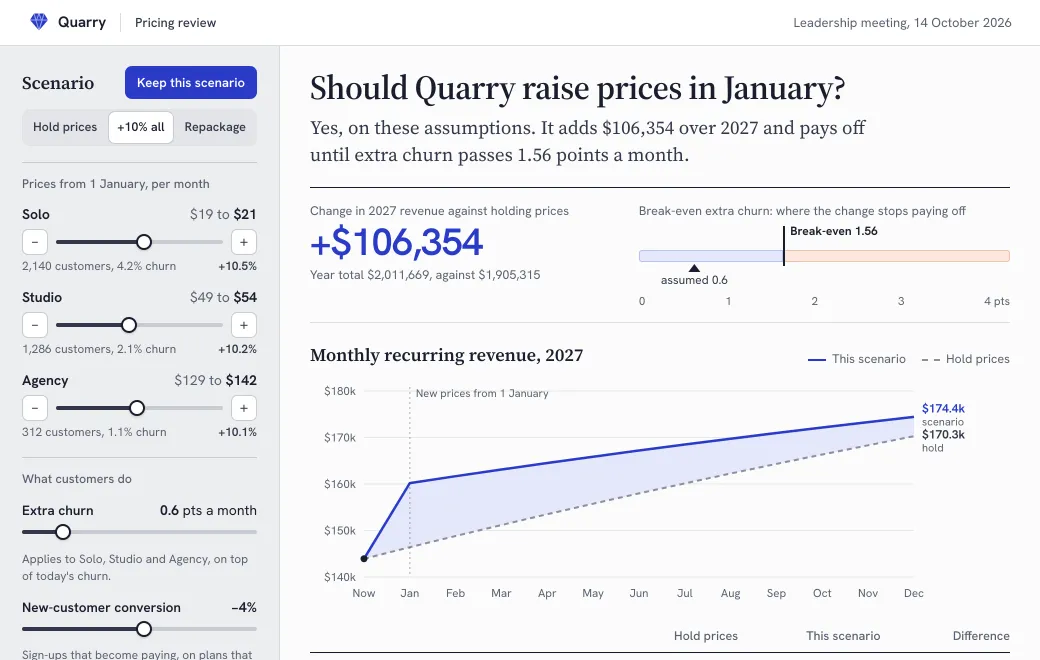
Quarry pricing scenarios. A pricing model with two scenarios already kept for comparison.A sample. The company and its numbers are made up.
  1. Drag extra churn past break-even, and the verdict flips.
  2. Click a heatmap cell to try that scenario.
  3. Keep the scenario and compare it side by side.

Keep the discussion on the assumptions

“What if churn goes up a point?” With a slide deck, that question waits for next week’s version. On a scenario page, someone moves the slider and the room sees the answer. The meeting can then spend its time arguing about the assumptions.

Quarry’s pricing page above was built to help decide whether to raise prices in January. Its break-even point shows how much extra churn the increase can absorb, and you can keep the scenarios worth discussing side by side.

Build one you can defend

  1. Write the model down first

    Before you ask the agent, write down the inputs, the formula and what should happen at the edges. “Make a calculator” on its own isn’t enough to go on.

  2. Ask for a check table

    Have the agent compute expected results for three or four input sets, then check the page gives the same answers.

  3. Share it before the meeting

    Keep it Private to your team workspace, or invite the board or a client by email.

  4. Change the model at the same link

    “Add annual billing at a 15% discount.” The agent edits the model, and the link people bookmarked shows the new version.

The parts of a good scenario page

PartWhy it’s there
PresetsThe two or three options on the table, one click each
A few honest inputsOnly the levers that change the answer
The result over timeA chart, not just a number
Break-evenThe point where the decision flips
Kept scenariosSide by side, so the meeting ends with a comparison
AssumptionsWritten on the page, next to the result

Limits

  • Everything is calculated in the viewer’s browser. Inputs and kept scenarios aren’t saved or sent anywhere; they last while the page is open.
  • The page’s source is visible to anyone who can open it. Don’t publish a model you need to keep secret.
Prompt

Make your own

Have these ready, then paste the prompt into your agent:

  • The decision to make
  • Inputs with today’s values
  • The formula
  • The options on the table
Prompt
Build a scenario page for this decision as one self-contained HTML page:
[the decision]. Inputs: [list, with today’s values]. Model: [formula].

Show today against the scenario, a 12-month chart with both lines and hover
values, and the break-even point. Add presets for the options I list, and a
"Keep this scenario" button that adds the current one to a comparison table.
Write the assumptions on the page. Give me a check table for three input sets
and make sure the page matches it.

Publish it privately to artifact.guru and give me the link.

Common questions

Can people save their own scenario?

Not on the server. A page only remembers what people do while it’s open, so kept scenarios are for comparing in the meeting. If people need to take one away, add a “copy summary” button.

Can I update the model after the meeting?

Yes. Ask your agent for the change and it becomes the next version, at the same link.

Read next

More use cases

Try it with your own file

Copy the prompt above, add your file and publish.