Skip to content

Use case

One document, edited by the whole team, at one link.

Several people can work on the same plan, spec or brief. Each edit, in the browser or through someone’s agent, becomes a version that records who changed what. Nobody overwrites anybody.

Who it’s for: Product, operations and project teams who keep living documents

artifact.guru/tessel/q4-launch-planPrivateFull screen

Priya Raman, with Codex Added the risk register and rollout dates, resolved two open questions

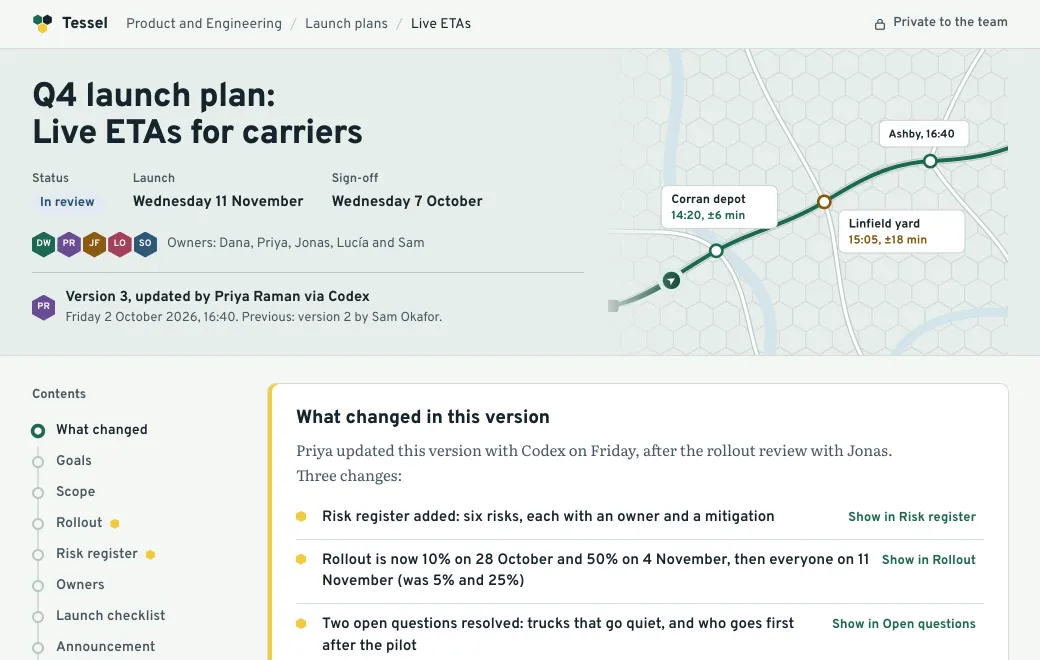
Tessel Q4 launch plan. Switch versions above it to see who changed what.A sample. The company and its numbers are made up.
  1. Switch between v1, v2 and v3 above the document.
  2. In v3, choose “Show in Rollout” to jump to the change.
  3. Tick off a checklist item to update the progress.

Three people, three versions

Three people worked on the Tessel launch plan above, and you can switch between their versions. Dana started it with Claude, Sam moved the date in the browser, and Priya had Codex add a risk register. The link everyone bookmarked never changed, and it always opens the live version.

VersionWhoHowWhat changed
1DanaWith ClaudeFirst draft
2SamIn the browser editorLaunch date, announcement, FAQ
3PriyaWith CodexRisk register, rollout dates, two answers

Two ways to edit

  1. In the browser

    Open the artifact and choose Edit. Markdown, HTML, Mermaid and Excalidraw open with the source beside a live preview; PowerPoint opens in a slide editor. Save publishes the next version.

  2. Through your agent

    Everyone on the team can connect whichever agent they use. Tell it “In the Q4 launch plan, move the 25% rollout to November 18”, and it edits only that part.

Nobody overwrites anybody

Every agent edit names the version it started from. If a teammate published a newer version in the meantime, the edit is refused with a note saying who changed it. The agent then reads the latest version and tries again. Two people can work on the same document on the same afternoon without losing each other’s changes.

History you can trust

  • The Versions list shows each version’s message, who published it and when.
  • Roll back makes an earlier version live in a click; newer versions are kept, so you can move forward again.
  • Search finds the document by any word inside it, across every project in the workspace.
Who can open it

In a team workspace, Private means the whole team, and only the team. To bring in a contractor or a client for one document, invite them by email. Everyone opens the same link, and it always shows the live version.

Prompt

Make your own

Have these ready, then paste the prompt into your agent:

  • The document’s outline
  • Owners for each part
  • Dates and decisions so far
Prompt
Write our launch plan as one self-contained HTML document: a table of
contents, status and owners at the top, a timeline, a checklist with progress,
open questions, and a "what changed in this version" list at the top.

Publish it privately to artifact.guru in the Launches project and give me the
link. When teammates edit it later, keep the layout and only change what
they ask for.

Common questions

Can two people edit at the same time?

One after another. If someone saved a newer version while your agent was working, the edit is refused instead of overwriting theirs, and the agent tries again on the latest.

Does everyone need the same AI tool?

No. Each person connects whichever agent they use (Claude, ChatGPT, Codex, Gemini CLI, Grok or any MCP client), or edits in the browser.

Can I see what changed between versions?

The Versions list shows each version’s message, who published it and when. For a readable summary, ask your agent to keep a “what changed” section at the top of the document, as the Tessel plan does.

Read next

More use cases

Try it with your own file

Copy the prompt above, add your file and publish.