The question, in four parts
- Can the client open it? Yes, in any browser, phone included, behind a code or an email sign-in if you choose.
- Can it replace the PDF? For deciding, yes. For the record, no.
- What happens when they say yes? The page shows a confirmation. You hear about it through an email link or a form service, because the page has no server.
- What if they want changes? You publish version 2 to the same link.
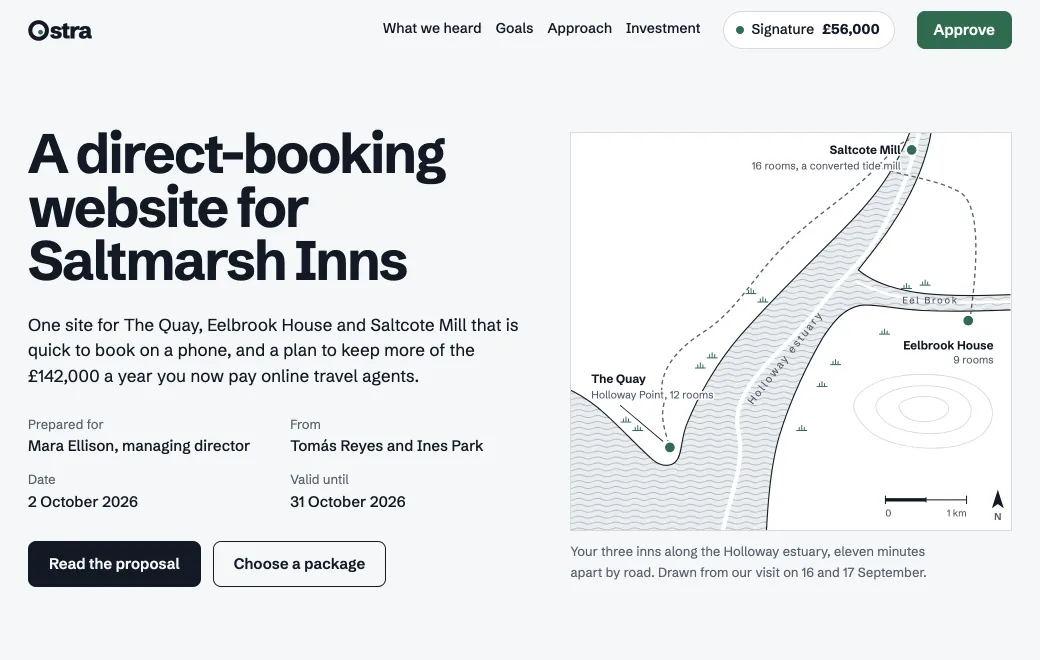
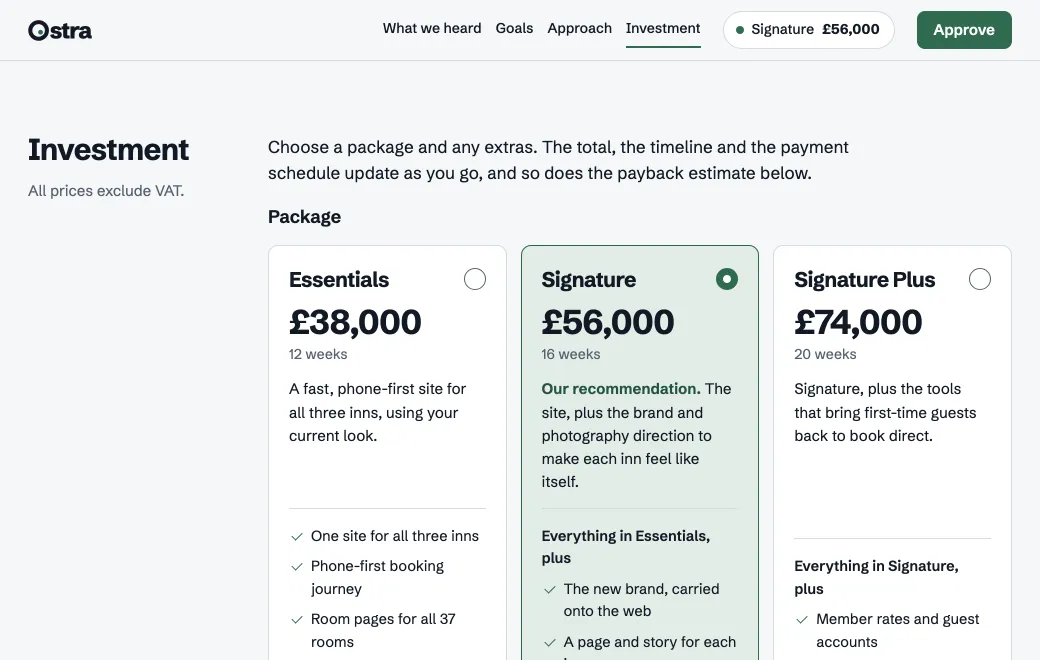
Ostra Studio’s proposal below offers Saltmarsh Inns one booking website for all three of its inns. Choose a package or add an extra, and the total and launch date update.
What a page can do that a PDF can’t
It’s a single HTML file, and four parts of it would be dead text in a PDF:
| In the page | What the client does | In a PDF |
|---|---|---|
| Packages they choose | Picks Essentials (£38,000, 12 weeks), Signature (£56,000, 16 weeks) or Signature Plus (£74,000, 20 weeks), plus any of four extras | Three columns, and sums in the margin |
| A total that follows | Sees the total, launch date and 30/40/30 payments change. Signature goes live by Friday, March 5, 2027, with a first invoice of £16,800. | One total, for the option you guessed |
| Their own payback | Drags a slider for the share of bookings moving from agencies to direct. At 16 points, Signature pays back in 19 months. | One forecast |
| An approval step | Types a name, ticks the terms and presses Approve proposal. The page says “Approved. Thank you, Mara.” and shows a summary with the reference OST-2026-114 | Print, sign, scan, reply |
A range instead of one number
An honest estimate gives a range. Copperline Labs’ estimate below prices the Plumbline inspection app at $148k to $226k, most likely $179k.
The team and the payments follow the modules you switch on. Choose Lean MVP, and the range and timeline shrink. A PDF would show only one scope.
What a PDF still does better
- The signed contract. E-signature tools work with a fixed document. Sign there, not in the page.
- The archive copy. A link shows whichever version is live. In a year you’ll want the terms as agreed, in a file nobody can change.
- Procurement portals. If the client’s purchasing team wants documents uploaded to a supplier portal, upload a file.
- Offline reading. A PDF opens on a plane. A page needs a connection.
If the client asked for a PDF, or it’s a small fixed quote, just send the PDF.
Use both: the page to decide, a PDF to keep
- Send the page
The client explores packages and brings questions to the call.
- Get the yes
They approve in the page and send you the email it prepares.
- Send the contract
Put the agreed package, total and payments into your contract tool.
- Keep the record
File the signed PDF with your contracts, or upload it to the proposal’s project and leave it Private.
Brief your agent, then check the page
Attach your discovery-call notes, packages and prices, one or two past projects you can name, and your terms. Then say:
Write a proposal for [client] as one self-contained HTML page that
works on a phone. Use only the facts in my notes; if something is
missing, ask me.

Sections: what we heard, goals with targets, phases with weeks, two
past projects, the team, investment, approve.

In Investment, the client chooses a package and extras, and the total,
launch date and a 30/40/30 payment schedule follow. In Approve, they
type their name and tick the terms, and the page shows a summary. Say
there that the page doesn’t send anything on its own, and add a button
that opens an email to me with the summary filled in. Add a Save as
PDF button with a print stylesheet.

Publish it privately to artifact.guru and give me the link.
Before the client sees it:
- Open the link on your phone. It starts Private, so only your workspace can open it.
- Try every package and extra, and check each total against your own sums.
- Approve it yourself, and check that the email it opens is addressed to you.
- Remove anything the client shouldn’t read. Anyone who can open a page can read its source, including parts hidden on screen.
What the client sees on a phone
With a code, the link opens on a screen titled “Enter the code”, which tells the client the code was sent separately. They type the eight characters, such as KM7Q-4XPA, and tap Open. Our server checks the code before it sends any of the proposal.
With an Email invite, the screen says “Sign in to open”. They tap Continue, type the invited address and get a one-time code by email. Someone new creates an account in the same step, with no password and no plan. Any other address sees “You don’t have access”.
Then the proposal fills the screen under a slim bar with its title, Copy link and Download. Pasted into a chat, the link’s preview says “Protected link” or “Invite-only link”, without the title.
Know when they opened it
Open the proposal and switch from Versions to Views. On an Email link you see who opened it, when and how often, and who hasn’t yet. On a code link you see counts instead, such as views and where the link was clicked. The counts cover the last 30 days; the list of names isn’t limited to that window. Opens of a code link by your own workspace, while signed in, don’t count.
Revise after the call
Ask for the change, and say what must stay:
- “In the Saltmarsh proposal, remove the French and German translation from the extras and move the valid-until date to November 14. Change nothing else.”
The agent changes only those parts and publishes version 2 at the same link. The client sees it next time they open the link, or when they reload an open page. If a colleague edited the proposal after your agent read it, the agent’s edit is refused so it can’t overwrite theirs. Versions shows who published each version, and Roll back restores version 1. Nothing tells the client it changed, so say so when you follow up.
Limits
- The page has no server. The approval lives only in the client’s browser tab, and a reload or Undo approval clears it. You hear about it only when they press Email Tomás your approval and send the email it fills in. That email carries their package, total, timeline and first invoice. The Plumbline estimate puts it plainly: “this page doesn’t send anything on its own.”
- Forms need a service. Point an approval form at a form service by its full address; artifact.guru stores no form entries.
- An approval isn’t a signature. There’s no e-signature or signed record.
- No comments. The client replies by email or on a call.
- No watermarks or download blocking. Switch off Show controls to hide Download, but the client can still print what they see.