Work arrives in every format
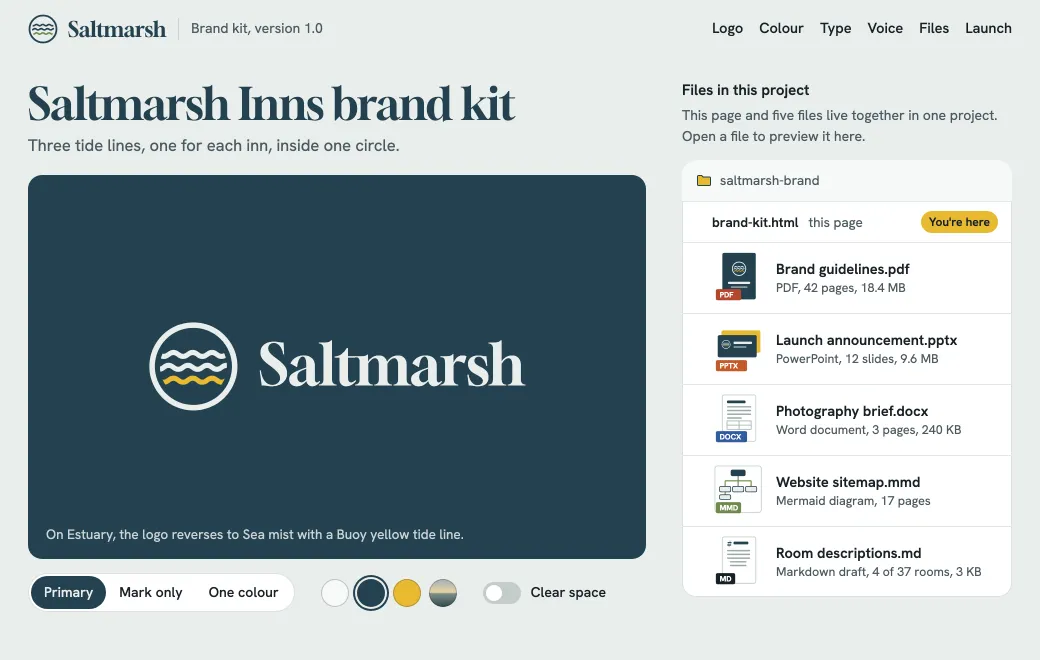
A brand handover is rarely one file. The 42-page PDF comes with a launch deck, a photography brief in Word and a few smaller pieces. Attached to an email, they scatter across inboxes. A shared drive isn’t much better, since the client still has to work out which file matters.
One HTML page does the explaining in the Saltmarsh brand kit above, from the logo on every background to the tone of voice. Its “Files in this project” section links to the rest. Each file is its own artifact in the same project and opens in the browser, with no app needed.
What opens in the browser
| Format | How it opens |
|---|---|
| Page by page | |
Word (.docx) | As a document |
PowerPoint (.pptx) | Slides to click through, editable in the browser |
| Markdown | Formatted, with Mermaid diagrams, Excalidraw sketches and Marp slides |
| Mermaid and Excalidraw | Drawn as a diagram or a sketch |
| Images | PNG, JPG, WebP, AVIF, SVG and more |
| HTML, React, a zipped site | Running, in a sandbox |
Every format gets a preview, and search reads the text inside PDF, Word and PowerPoint files too.
Put a handover together
- Make a project
Create a project for the client, then drop in every file, or ask your agent: “publish these five files to the Saltmarsh brand project”.
- Add a page that explains
Ask the agent for an HTML page that introduces the work and links to each file.
- Share each file with the right people
Share the brand kit page and the guidelines with the client team by Email, and give the photographer a Secret code for the brief. The contract stays Private.
- Replace files, keep links
Choose Upload new version on the guidelines PDF, or ask your agent, and the new export becomes its next version. The link in the brand kit page keeps working.
Limits
- Office previews are drawn in the browser and can differ from Office in places. Download gives the original.
- A single file can be up to 100 MB, or 250 MB on Team.
- A web page can’t embed another artifact’s private content; link to it instead.