Skip to content

Use case

Board packs and investor updates, on your own domain.

Publish documents at an address like board.yourcompany.com and lock them with a secret code. Past quarters stay in the history, and directors read a page that stays current instead of a PDF attachment.

Who it’s for: Founders, CFOs, chiefs of staff and investor relations

board.kestrelgrid.com/q3-2026Secret codeFull screen
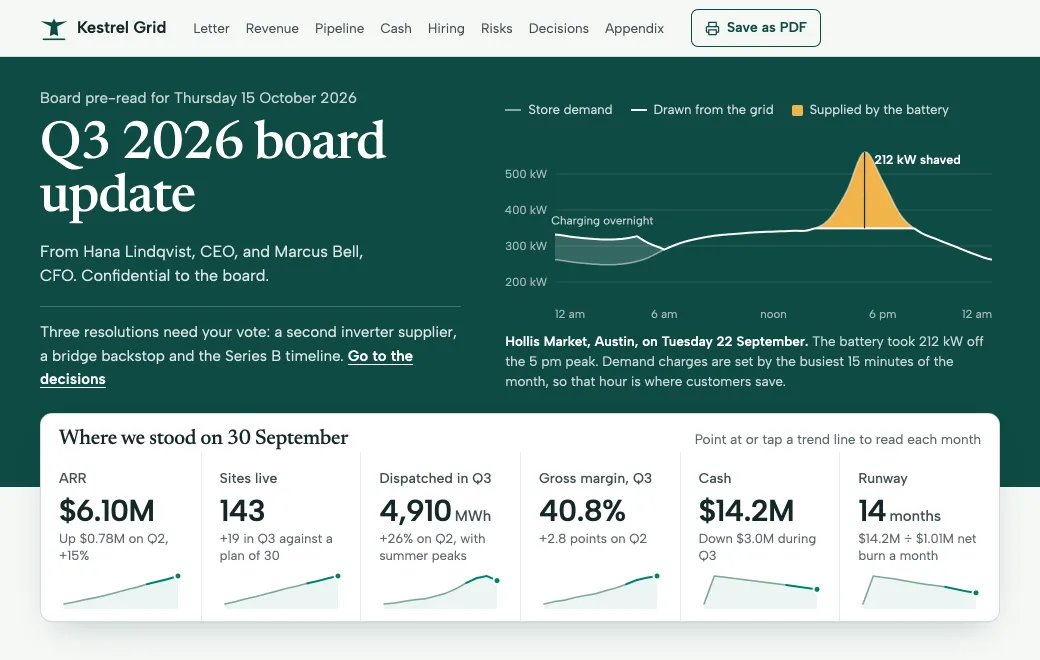
Kestrel Grid board update. The pre-read directors open before the quarterly meeting.A sample. The company and its numbers are made up.
  1. Switch the runway scenario to Bridge round.
  2. Point at a trend line under a headline number.
  3. Mark a decision to update the tally.

Why the address matters

A board pack usually arrives as an attachment named “Q3 board deck FINAL v2.pdf”. A link at board.yourcompany.com says who it’s from before anyone opens it.

In the Kestrel Grid board pack above, directors switch the cash runway between three scenarios and mark the decisions they’re ready to approve. “Save as PDF” still gives you a clean copy for the archive.

Set it up once

  1. Connect a subdomain

    In Settings → Custom domain, add something like board.yourcompany.com, then create two DNS records. The certificate is issued for you. Custom domains come with the Individual and Team plans.

  2. Publish the update

    Ask your agent to build the quarter’s update from your numbers and publish it. It starts Private, visible only to your workspace.

  3. Share it with a code

    Turn on a Secret code that expires in 30 days, and send directors the link and the code separately. From then on, the link opens on your domain.

Every quarter, one place

ApproachWhen it fits
One artifact per quarter, in a Board projectEach quarter keeps its own link and code; search finds any of them
One living link, a new version each quarterDirectors keep one bookmark; past quarters stay in the version history

Either way, nothing gets lost in an inbox, and you can give a new director the whole history in one link.

Stay in control

  • Views shows how many people opened it and on which days. It also shows where they came from.
  • New code replaces the old one at once, and anyone who only knows the old code is locked out.
  • Switch the link to Private and pages already open stop loading anything new within about a minute.
  • Shared links ask search engines not to index them.

Other documents on your domain

Every public and secret-code link in the workspace opens on the same domain. Use it for investor updates and release notes, or for a security overview a customer needs to review.
Prompt

Make your own

Have these ready, then paste the prompt into your agent:

  • This quarter’s numbers and plan
  • The CEO letter
  • Cash, burn and scenarios
  • The decisions you need
Prompt
Build our Q3 board update as one self-contained HTML document: a short CEO
letter, headline numbers with sparklines, revenue against plan, pipeline, cash
and runway with a scenario switch (the scenarios I list), hiring, risks, and
the decisions we need from the board. Put the appendix in expandable sections.
Use only my numbers and make sure runway equals cash divided by net burn.
Add a print stylesheet for a clean PDF.

Publish it privately to artifact.guru in the Board project and give me the
link.

Common questions

Can directors open it without an account?

Yes, with the secret code. That’s also what lets the link open on your own domain.

Can I see who opened it?

On a secret-code link you see counts, not names. To see each director by name, invite them by email instead; that link opens on artifact.guru.

Does it need a separate domain per document?

No. One subdomain serves every public and secret-code link in the workspace, each at its own path.

Read next

More use cases

Try it with your own file

Copy the prompt above, add your file and publish.